
Technology
Why Auto Clickers are Quietly Changing the Way We Play

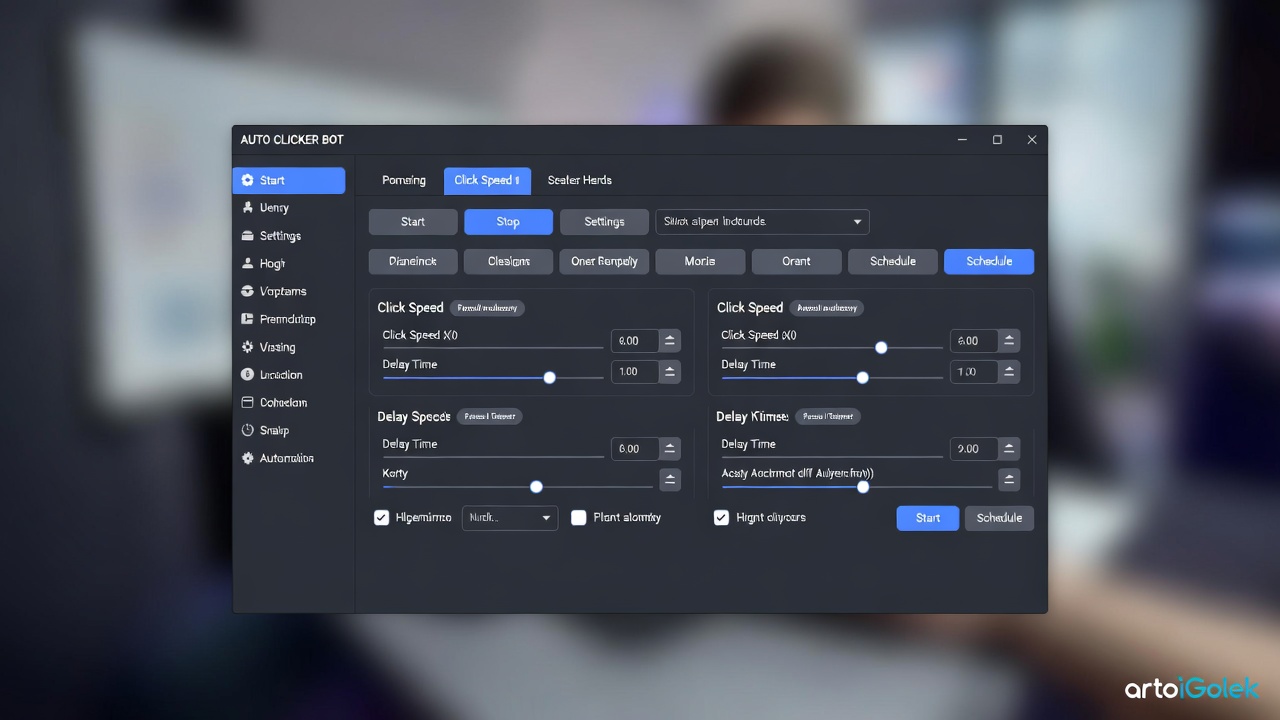
Let’s be honest: we’ve all been there. You’re three hours into a deep RPG or a soul-sucking (but addictive) idle game, and your index finger is starting to feel like it’s run a marathon. From the frantic clicking of Cookie Clicker to the heavy resource grinding in modern sims, gaming has shifted. It’s less about raw “twitch” reflexes these days and more about the long game.
As games get deeper and more system-driven, our poor hardware and our hands are being pushed to the limit. That’s where auto clickers come in. Once seen as a “cheaty” little secret for browser games, these tools have moved into the mainstream conversation about accessibility, design, and how we actually spend our time behind the screen.
What Exactly is an Auto Clicker?
If you’ve never used one, think of an auto clicker as a digital “macro” buddy. It’s a utility that mimics your mouse clicks at whatever speed you tell it to. Instead of destroying your mouse switches (and your joints) clicking 5,000 times to level up a building, you configure the software to do the heavy lifting.
Most tools let you tweak the specifics, such as:
- Click Interval: Anywhere from 100 clicks per second to once every ten minutes.
- Repetition Limits: Stop after a certain amount of time or a specific number of clicks.
- Click Type: Toggle it on/off with a hotkey or hold a button to activate.
- Targeting: Keep the cursor locked in one spot or let it follow your mouse.
While gamers are the primary “customers,” these tools are actually huge in productivity and QA testing. Sometimes, consistency is just more valuable than human speed.
The “Grind” Problem: Why Do We Even Need These?
Repetition is a double-edged sword in game design. On one hand, “the grind” makes hitting a milestone feel earned. Whether you’re harvesting wood or farming XP, that effort builds investment. Studios like Playsaurus (the brains behind Clicker Heroes) have mastered this, creating loops that span weeks or months.
But let’s keep it real: at a certain point, clicking a button for the 10,000th time isn’t “gameplay”—it’s a chore. In many modern titles, automation isn’t just a shortcut; it’s practically an expected part of the meta. Players realize that the strategy is the fun part, not the manual labor of clicking.
More Than Just a Shortcut: Accessibility and Comfort
This is the part that often gets overlooked. For many, an auto clicker isn’t about “beating” the game—it’s about being able to play it.
- Physical Limitations: For players with RSI (Repetitive Strain Injury), carpal tunnel, or motor disabilities, rapid clicking isn’t just annoying; it’s painful or impossible.
- Consistency: Developers use these tools to stress-test their own interfaces. If a menu breaks after 500 clicks, it’s better to find that out via a script than a sore wrist.
Resources like autoclicker.com have popped up to help users navigate this, offering guides on how to use automation responsibly without breaking the game or your computer.
The Elephant in the Room: Is It Cheating?
This is where the conversation gets spicy. The ethics of auto-clicking really come down to context.
| The “Green” Zone (Generally Okay) | The “Red” Zone (Avoid!) |
| Single-player RPGs & Incremental games | Competitive Ranked Matchmaking |
| Offline simulation & building games | PvP Shooters or MMO Markets |
| Accessibility needs & physical comfort | Bypassing AFK timers in multiplayer lobbies |
In a solo world, you’re only “cheating” yourself out of a sore hand. But in a competitive arena, automation creates an unfair playing field. Most developers are fine with tools that reduce friction, but they’ll bring the ban hammer down the moment you use them to gain an edge over other human players.
Steam and the Rules of the Road
If you’re a Steam user, you might wonder if you’ll get banned for having an auto clicker open. The short answer? It depends on the game. Valve doesn’t have a “Global Anti-Clicker” policy; they leave it up to the individual developers.
The Golden Rules for Responsible Automation:
- Keep it Offline: Use it for your solo saves.
- Read the ToS: If a game specifically says “No Macros,” listen to them.
- Don’t Be a Nuisance: Avoid using scripts in public lobbies where it might lag the server or ruin the vibe for others.
Final Thoughts
At the end of the day, auto clickers are a reflection of how gaming culture is evolving. We value our time more than ever, and we’re increasingly looking for ways to cut out the “busy work” so we can get to the “fun work.”
Using an auto clicker doesn’t mean you’re lazy. It often means you’re so invested in a game’s systems that you’ve found a way to make the experience fit your life and your physical limits. As games get longer and more complex, these tools are likely here to stay.



Table and Mini Games In Grand Theft Auto 6 – What Can We Expect?

How to Recover Lost Game Files from an External Drive on Mac

Mystery Anime You’ll Regret Starting at Midnight | Part 2

ARC Raiders Frozen Trail Guide: How to Board and Clear the Frigate

Rockstar Games Integrates Advanced Ray Tracing for GTA VI

How to Update Outdated Graphics Drivers for Better Gaming Performance and Higher FPS

The Most Popular Car Game Isn’t Where Players Stay Longest

Canada’s Gaming Audience Is Bigger Than the Old Stereotype

Anime You’ll Be Glad You Added to Your Fall Watchlist (Part 2) 🍂

WoW Forever Leveling: What Is New on the Road from 1 to 60

MM2 weapon rarity tiers explained for traders
Canada’s Gaming Audience Is Bigger Than the Old Stereotype

Why Sports Games Keep Getting Better at Simulating the Real Thing

Mystery Anime You’ll Regret Starting at Midnight | Part 1
Rockstar Games Integrates Advanced Ray Tracing for GTA VI
ARC Raiders Frozen Trail Guide: How to Board and Clear the Frigate
-
 Anime3 weeks ago
Anime You’ll Be Glad You Added to Your Fall Watchlist (Part 2) 🍂
-
 Features3 weeks ago
WoW Forever Leveling: What Is New on the Road from 1 to 60
-
 Esports3 weeks ago
MM2 weapon rarity tiers explained for traders
-
 Features2 weeks ago
Canada’s Gaming Audience Is Bigger Than the Old Stereotype
-
 Features3 weeks ago
Why Sports Games Keep Getting Better at Simulating the Real Thing
-
 Anime2 weeks ago
Mystery Anime You’ll Regret Starting at Midnight | Part 1
-
 Gaming News1 week ago
Rockstar Games Integrates Advanced Ray Tracing for GTA VI
-
 Features1 week ago
ARC Raiders Frozen Trail Guide: How to Board and Clear the Frigate
-

 Features3 weeks ago
8 Underrated PC Games Worth Playing in 2026 (That Aren’t Getting the Attention They Deserve)
-
 Features2 weeks ago
The Most Popular Car Game Isn’t Where Players Stay Longest
-
 Guides4 weeks ago
Minecraft All Biomes Seeds for Players Who Love Exploring
-

 Features3 weeks ago
From Consoles to Phones: How Canadian Gaming Became an Anytime Experience