
Technology
The Dos and Don’ts of Building a Gaming PC

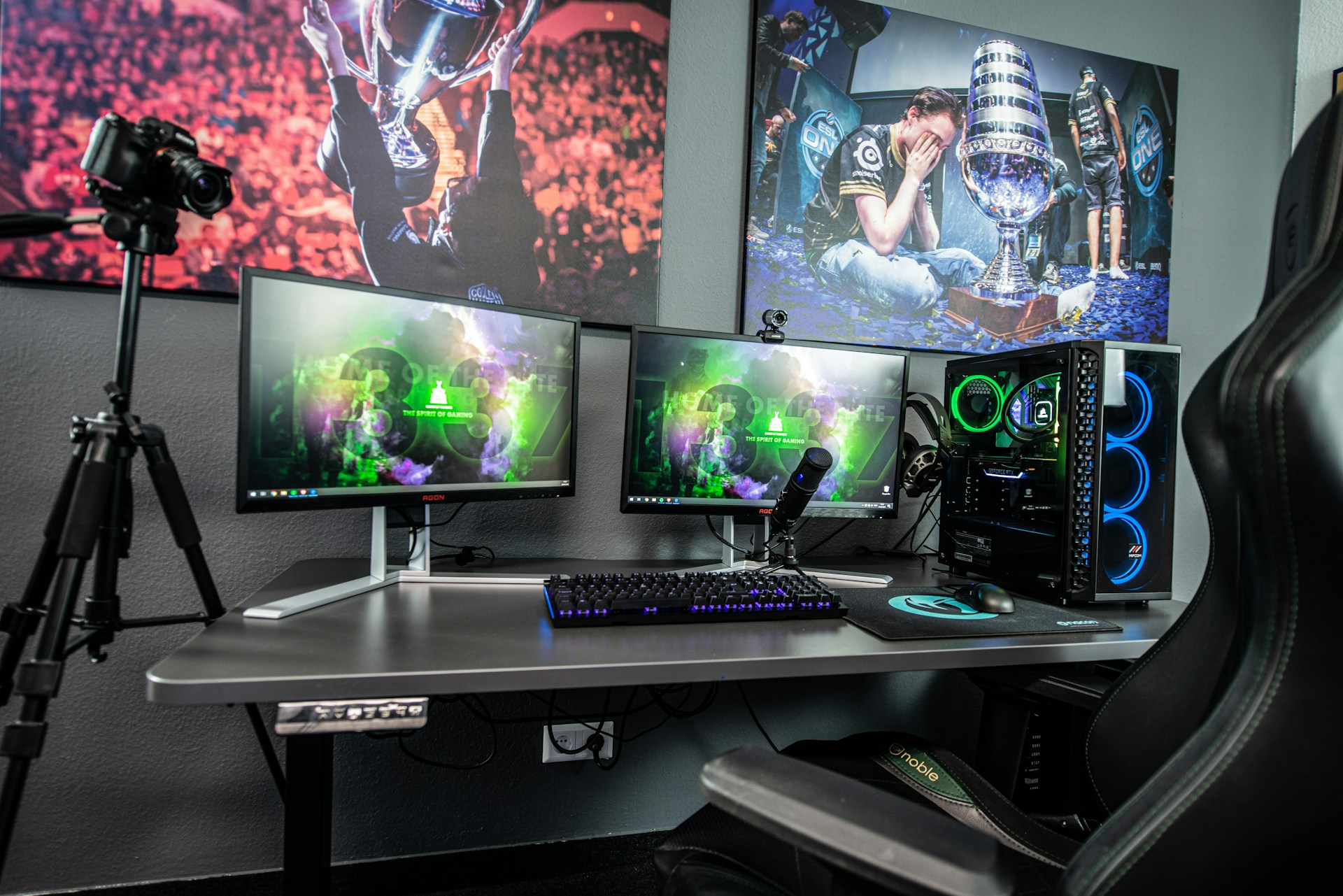
Building a gaming PC is one of those projects that sounds simple right up until the boxes arrive. Then the questions start. Did you buy the right motherboard? Is the power supply strong enough? Why are there suddenly eight tiny screws on the table and only six holes that seem to need them? That mix of excitement and mild panic is normal. A first build is rarely elegant. It just needs to be well planned.
The best builds usually start before a single part is opened. Clear a large work surface, get decent lighting, and keep basic tools close by. Even a small setup detail, like having a rotating plug extension cord nearby, can make the process less annoying when you need to power a monitor, charge your phone, and test the system without crawling behind furniture every ten minutes. Good prep does not make the build glamorous. It does make it calmer.
Build Around What You Actually Play
The first mistake is building for fantasy instead of reality. A lot of people shop as if they are about to stream in 4K, edit cinema-grade video, and run the heaviest game on the market at ultra settings for the next six years. Most are not. If you mainly play competitive shooters at 1080p, your priorities are different from someone building for ray-traced single-player games on a 1440p ultrawide.
Do start with your monitor, the games you actually play, and the frame rates you want. Those three things shape the build more honestly than any benchmark rabbit hole. A machine meant for Counter-Strike 2, Valorant, Fortnite, or Call of Duty asks different things from a system meant for Cyberpunk 2077, Starfield, or Microsoft Flight Simulator.
Don’t throw half your budget at one flashy part and expect the rest of the build to sort itself out. A top-tier graphics card paired with a weak CPU, poor airflow, or bargain memory is still an unbalanced machine. Balance is less exciting than a hero part, but it wins more often.
Get Compatibility Right Before You Buy Anything
This is the boring part, which is exactly why people skip it. Then they end up with a motherboard that needs a BIOS update for the CPU, a cooler that blocks the RAM, or a case that looks great until the graphics card arrives and does not fit. None of these problems is rare.
Do confirm the socket, chipset, RAM type, cooler clearance, case GPU clearance, and power requirements before you place the order. If you are building on a modern AMD platform, memory support and EXPO profiles are worth checking. If you are building on Intel, make sure the board matches the generation and the RAM standard you are actually buying. A compatibility checker is not a sign of inexperience. It is a sign that you want the machine to turn on the first time.
Don’t assume “close enough” will work. DDR4 and DDR5 are not interchangeable. Full-size ATX and Micro-ATX cases do not solve the same fit questions. Motherboard photos are not measurements. This is where patience saves money.
Do Not Cheap Out on the Boring Parts
Every first-time builder is tempted to spend money where it shows and trim the budget where it doesn’t. That usually means the graphics card looks heroic, while the power supply, case fans, storage, and cooler quietly take the hit. Bad move.
Do buy a solid power supply from a reputable line with enough headroom for the system you are building. The PSU is not where you get clever. It is where you get reliable. The same goes for cooling and airflow. A decent case with sensible fan placement is better than a glass box that cooks your parts just for a nice photo.
Storage is another place where people create future annoyance. A tiny boot drive looks cheap at checkout and irritating a month later. Games are large. Windows is not small. Start with enough SSD space that you are not uninstalling titles you still want because the drive filled faster than expected. Windows 11 itself needs 64 GB of storage just to meet the minimum requirement, and real-world use grows quickly from there.
Build Slowly and Touch Everything Once
A gaming PC does not reward speed. Rushing causes stripped screws, bent pins, forgotten standoffs, bad thermal paste, loose front-panel connectors, and the classic mistake of fully assembling the whole machine before noticing the I/O shield was never installed. Yes, people still do that.
Do take it in stages. Install the CPU carefully. Seat the memory fully. Mount the cooler with patience. If the motherboard manual shows RAM slots A2 and B2 for two sticks, use them. Make sure every power connector clicks into place, especially the CPU power connector near the top of the board and the GPU power connector on the card. A build can look complete and still fail because one cable is half-seated.
Don’t use force when the part clearly doesn’t want to go. Most PC components fit with firm pressure and correct alignment, not brute strength. If something feels wrong, stop and check orientation. The machine is not testing your confidence. It is telling you to slow down.
First Boot Problems Are Normal, Panic Is Optional
There is a strange silence that follows the first power button press. Fans spin. RGB lights up. Maybe nothing appears on screen. Maybe the system starts, shuts off, then starts again. New builders tend to interpret every odd first boot as a disaster. Usually, it is not.
Do check the simple stuff first. Monitor plugged into the graphics card, not the motherboard, if you are using a dedicated GPU. RAM is fully seated. Front-panel power switch is connected correctly. CPU power cable attached. BIOS settings reset if needed. On some platforms, the first boot takes longer because the board is training memory. That can feel suspicious if you are expecting instant success.
Don’t start disassembling everything in the first two minutes. Work methodically. One cable, one component, one test at a time. Most first-boot issues are basic. They feel dramatic because you just built the machine, and now every small problem feels personal.
Finish the Build Properly Once It Works
A PC that posts is not finished. It is just alive. Now you still need to update the BIOS if needed, install Windows, load chipset and GPU drivers, set the correct refresh rate, enable your RAM profile if the platform supports it, and check temperatures under load. This stage is less exciting than opening boxes, but it affects daily performance more than people expect. AMD EXPO is one example of a setting that can matter if you bought memory designed for it and want the kit to run at its rated profile.
Do spend an hour finishing the job. Tidy the cables enough that airflow is not blocked. Install the software you need. Run a few games. Watch CPU and GPU temps. Listen for odd fan noise. Confirm that your storage is showing correctly and that your internet, audio, and USB devices all behave as expected.
Don’t treat the first successful boot like the end of the story. A gaming PC becomes satisfying after the setup is cleaned up, the settings are right, and the machine feels stable. That is when the build stops being a project and starts being yours.
Featured Image Source: https://unsplash.com/photos/black-computer-keyboard-on-white-table-0oqMvhc1ntw



Table and Mini Games In Grand Theft Auto 6 – What Can We Expect?

How to Recover Lost Game Files from an External Drive on Mac

Mystery Anime You’ll Regret Starting at Midnight | Part 2

ARC Raiders Frozen Trail Guide: How to Board and Clear the Frigate

Rockstar Games Integrates Advanced Ray Tracing for GTA VI

How to Update Outdated Graphics Drivers for Better Gaming Performance and Higher FPS

The Most Popular Car Game Isn’t Where Players Stay Longest

Canada’s Gaming Audience Is Bigger Than the Old Stereotype

Anime You’ll Be Glad You Added to Your Fall Watchlist (Part 2) 🍂

WoW Forever Leveling: What Is New on the Road from 1 to 60

MM2 weapon rarity tiers explained for traders
Canada’s Gaming Audience Is Bigger Than the Old Stereotype

8 Underrated PC Games Worth Playing in 2026 (That Aren’t Getting the Attention They Deserve)

Why Sports Games Keep Getting Better at Simulating the Real Thing

Mystery Anime You’ll Regret Starting at Midnight | Part 1
The Most Popular Car Game Isn’t Where Players Stay Longest
-
 Anime3 weeks ago
Anime You’ll Be Glad You Added to Your Fall Watchlist (Part 2) 🍂
-
 Features3 weeks ago
WoW Forever Leveling: What Is New on the Road from 1 to 60
-
 Esports3 weeks ago
MM2 weapon rarity tiers explained for traders
-
 Features2 weeks ago
Canada’s Gaming Audience Is Bigger Than the Old Stereotype
-
 Features3 weeks ago
8 Underrated PC Games Worth Playing in 2026 (That Aren’t Getting the Attention They Deserve)
-
 Features3 weeks ago
Why Sports Games Keep Getting Better at Simulating the Real Thing
-
 Anime2 weeks ago
Mystery Anime You’ll Regret Starting at Midnight | Part 1
-
 Features2 weeks ago
The Most Popular Car Game Isn’t Where Players Stay Longest
-
 Gaming News1 week ago
Rockstar Games Integrates Advanced Ray Tracing for GTA VI
-
 Features1 week ago
ARC Raiders Frozen Trail Guide: How to Board and Clear the Frigate
-

 Features3 weeks ago
From Consoles to Phones: How Canadian Gaming Became an Anytime Experience
-
 Anime7 days ago
Mystery Anime You’ll Regret Starting at Midnight | Part 2