
Technology
How to Remove Background Music from Video Online for Free

In the world of online video and video games, clear, focused audio is paramount. Whether you’re recording a lecture, an interview, streaming games online or repurposing existing content, unwanted background music can ruin the message, or worse, trigger a costly copyright strike. Fortunately, a new generation of powerful online vocal remover tools is making it easier than ever to address this issue without needing complex, expensive software.
These online tools allow you to easily extract or mute the audio track right from your browser, saving you the time and hassle of downloading, installing, and ultimately uninstalling heavy desktop applications. Common use cases for this technology include eliminating copyrighted music from clips you wish to reuse or simply replacing distracting background music with your own custom audio or a voiceover. This article will explore why online audio separation is the modern solution and review three of the most reliable methods for removing background music from a video for free.
Why Strip Background Music from Video Online Free
The shift to browser-based audio editing offers significant advantages for content creators and casual users alike:
1. Obviate the Need to Download
Online tools are immediately accessible with an internet connection. There is no waiting for large files to download or running lengthy setup wizards. This convenience is a major draw, especially for a one-time task or when using a shared computer.
2. Cost-Effective Solution
Most high-quality online vocal removers are cost-effective, offering a free tier or a generous daily time limit. This makes them a perfect solution for one-time users or those needing to process just a few files, allowing you to get rid of background noise for free without making any monetary investment.
3. Convenient and User-Friendly
Online vocal removers are typically designed with a clean, intuitive interface. They offer quick, hassle-free noise and music removal, often utilizing AI technology that processes the file with high accuracy. This allows for real-time processing and results, making the experience far smoother than navigating the steep learning curve of professional desktop software.
Extracting Background Music from Video Online Free (3 Ways)
Modern online tools use Artificial Intelligence (AI) and “stem separation” technology to intelligently identify and isolate different audio components—such as vocals, music, drums, and other noises—from a single track. This is far superior to older methods that simply tried to cancel out center-panned sounds, leading to cleaner, more professional results.
Here are three reliable online tools to achieve a clean music separation:
1. EaseUS Online Vocal Remover
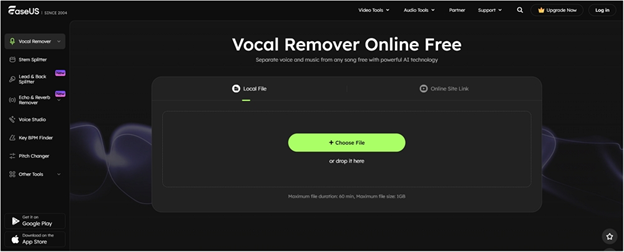
The EaseUS Vocal Remover is a standout choice, specifically tailored for users who want to isolate vocals or remove music from a video/audio file with maximum simplicity and speed.
| Rating | Key Features/Limitations |
| ⭐⭐⭐⭐⭐ (5/5) | Pros: Extremely fast processing (often under 60 seconds); clean separation quality; supports numerous video and audio formats (MP4, MOV, MP3, WAV, etc.); very beginner-friendly interface. Cons: Output is often limited to MP3 unless converted separately. |
Step-by-Step Guide:
- Visit the EaseUS website and navigate to the Vocal Remover tool.
- Click “Choose File” or drag-and-drop your video file (e.g., MP4, MOV) into the designated area. The AI will immediately begin analyzing the file.
- Once the processing is complete, the tool will display the separated tracks: one for the music (Instrumental) and one for the voice (Vocal). To remove the music, simply focus on the Vocal track.
- Click the “Export” button to download the newly created audio track that contains only the voices from your video.
2. Vocal Remover and Isolation
This tool is one of the most popular free vocal removers available, specifically designed to split a file into two distinct, high-quality tracks: one with vocals and one with instrumentals.
| Rating | Key Features/Limitations |
| ⭐⭐⭐⭐⭐ (5/5) | Pros: 100% free and easy to use; excellent for isolating instrumentals or vocals; very fast processing (around 10-20 seconds); offers other tools like pitch changer and karaoke maker. Cons: Primarily focuses on audio file input, though video formats are often converted to audio before processing. |
Step-by-Step Guide:
- Go to the Vocal Remover website.
- Click “Browse my files” and upload your video file. The AI will automatically begin processing.
- After processing, the tool presents two tracks: a “Music” track and a “Vocal” track, each with its own volume slider.
- To remove the background music, simply drag the “Music” volume slider all the way to 0.
- Click the “Save” button (usually in the lower right) to download the new, music-free version of your audio.
3. Media.io Vocal Remover
Media.io is a robust online suite that offers a reliable AI-powered vocal remover capable of cleanly separating music and voice tracks from video files.
| Rating | Key Features/Limitations |
| ⭐⭐⭐⭐☆ (4.5/5) | Pros: High accuracy with AI stem separation; supports various video and audio formats; maintains good audio quality on separation. Cons: Free version may have limitations on file size (e.g., 100MB) or number of exports per day; often requires an account to download the final output. |
Step-by-Step Guide:
- Navigate to the Media.io Vocal Remover tool.
- Click “Choose Files” or drag your video into the interface.
- Once uploaded, the AI will process the file. You will typically see an option for “Vocal & Background Music” separation.
- After the separation is complete, the instrumental and vocal tracks will be available for download. To strip the background music, download the Vocal track.
Conclusion
Removing background music from a video clip is no longer a task that requires expensive software or a professional video editor. The advent of AI-powered online vocal removers has democratized the process, making it fast, free, and accessible to anyone with an internet connection.
In this competitive field, the best tool is often the one that balances speed, accuracy, and ease of use. While all three tools reviewed provide excellent free service, EaseUS Online Vocal Remover stands out as the best option due to its remarkably speedy processing, clean AI separation, and incredibly user-friendly interface that gets the job done in three clicks. The power to create clean, focused content is now literally at your fingertips.
FAQs
Q: Is it really free to remove background music online?
A: Yes, most quality online vocal removers offer a completely free tier. These free versions usually have limits on file size, daily usage, or processing speed, but they are perfectly adequate for most standard video files.
Q: Can I remove background music without affecting the speech/dialogue?
A: Absolutely. Modern online tools use sophisticated AI to perform “stem separation,” which specifically isolates the vocal frequencies from the instrumental or music frequencies. This allows you to download a clean audio track with only the dialogue and speech remaining, leaving minimal artifacts.
Q: What video formats are typically supported?
A: Most popular online tools support common video formats such as MP4, MOV, and MKV. When you upload a video, the tool automatically extracts the audio track for processing.
Q: What’s the difference between ‘Vocal Remover’ and ‘Noise Reduction’?
A: A Vocal Remover specifically isolates and removes structured audio components like singing, instrumental music, or backing tracks. Noise Reduction focuses on removing non-structured, unwanted ambient sound like wind, static, hums, or traffic. While many tools can do both, a dedicated vocal remover (like those reviewed) is best for splitting musical layers.



How to Recover Lost Game Files from an External Drive on Mac

Mystery Anime You’ll Regret Starting at Midnight | Part 2

ARC Raiders Frozen Trail Guide: How to Board and Clear the Frigate

Rockstar Games Integrates Advanced Ray Tracing for GTA VI

How to Update Outdated Graphics Drivers for Better Gaming Performance and Higher FPS

The Most Popular Car Game Isn’t Where Players Stay Longest

Canada’s Gaming Audience Is Bigger Than the Old Stereotype

Mystery Anime You’ll Regret Starting at Midnight | Part 1

Anime You’ll Be Glad You Added to Your Fall Watchlist (Part 2) 🍂

WoW Forever Leveling: What Is New on the Road from 1 to 60

MM2 weapon rarity tiers explained for traders

Blox Fruits Physical vs Permanent Fruits: What’s the Difference?

What to Check Before Buying FC 27 Coins Online

Pokémon Announces New Movie With a New Hero and Mimikyu

Double-Sentinel Defensive Holds Disrupt Fast Valorant Site Executes
Canada’s Gaming Audience Is Bigger Than the Old Stereotype
-
 Anime3 weeks ago
Anime You’ll Be Glad You Added to Your Fall Watchlist (Part 2) 🍂
-
 Features3 weeks ago
WoW Forever Leveling: What Is New on the Road from 1 to 60
-
 Esports3 weeks ago
MM2 weapon rarity tiers explained for traders
-
 Features4 weeks ago
Blox Fruits Physical vs Permanent Fruits: What’s the Difference?
-
 Features4 weeks ago
What to Check Before Buying FC 27 Coins Online
-
 Anime4 weeks ago
Pokémon Announces New Movie With a New Hero and Mimikyu
-
 Esports4 weeks ago
Double-Sentinel Defensive Holds Disrupt Fast Valorant Site Executes
-
 Features2 weeks ago
Canada’s Gaming Audience Is Bigger Than the Old Stereotype
-
 Anime2 weeks ago
Mystery Anime You’ll Regret Starting at Midnight | Part 1
-

 Features3 weeks ago
Why Sports Games Keep Getting Better at Simulating the Real Thing
-

 Features3 weeks ago
8 Underrated PC Games Worth Playing in 2026 (That Aren’t Getting the Attention They Deserve)
-
 Features1 week ago
The Most Popular Car Game Isn’t Where Players Stay Longest