
Features
Struckd on Windows: Making 3D Games Without Writing a Line of Code

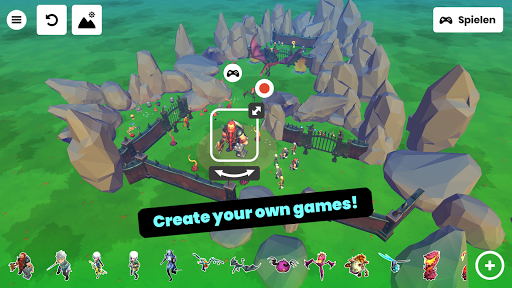
Open Struckd and the first thing you notice is that it doesn’t behave like a development tool. There’s no project wizard, no asset import dialog, no timeline. You get a grid, a floating menu of objects, and a play button. That’s the whole pitch: a virtual gaming platform where people build, share and play games with no coding required, listed under Casual rather than anything that sounds like software engineering.
That categorization is honest. Struckd is closer to a sandbox toy than to Unity, and the community around it (creators in more than 150 countries, by the developers’ own description) treats it that way.
The Drag and Drop Editor in Practice
Creation starts with a template choice: racing, adventure, puzzle, shooter, or an empty scene. Pick racing and you’re dropped into a flat world with a car already placed and a checkpoint waiting to be duplicated. From there, building is literal dragging. You pull a ramp out of the object drawer, slide it into place, rotate it with a handle, and hit play to see whether the jump lands.
Behavior comes from properties rather than scripts. Tap an object and you get sliders and toggles: is it solid, does it damage the player, does it move, how fast, does collecting it add points. Attach a “goal” to a coin and the coin ends the level. Attach it to a door instead and now you have an exit.
This is where Struckd earns its reputation. A ten year old can produce a playable level in fifteen minutes, and the level will run for anyone else in the community. The ceiling is low, but the floor is almost nonexistent.
Playing Other People’s Games
The play side of the app is a scrolling feed of user-generated games with thumbnails, play counts and likes. Quality swings wildly, which is what you’d expect from an open creation platform. You’ll load a beautifully arranged obstacle course, then a screen with three cubes and a title in all caps.
Sessions are short by design. Most community games last under two minutes, and there’s a rating prompt when you finish. Browsing feels a bit like scrolling a video feed: you sample fast, back out often, and occasionally find a creator whose entire catalog is worth playing through.
The mobile controls are on-screen sticks and buttons, and they carry over unchanged to desktop, which matters for the next part.
Struckd on a Windows Desktop
On a monitor, the editor stops being cramped. The object drawer and the property panel eat a lot of a phone screen, and on a 1080p window they sit at the edges while the scene keeps the middle. Placing objects with a mouse cursor is more precise than a fingertip, especially when you’re nudging platforms into alignment or stacking geometry for a tower.
Running it through BlueStacks is the usual route, and the setup detail that matters here is key mapping: the game’s virtual joystick and jump button need to be bound to WASD and space before playtesting feels normal, otherwise you’re click-dragging a thumbstick with a mouse. Anyone working through that mapping step can follow a walkthrough on how to download Struckd 3D for PC and get the controls sorted before building a level that depends on precise jumps.
Camera rotation is the other thing that changes. Two-finger orbiting becomes a click-drag, which is faster once your hand learns it.
Where the Editor Gets Clunky
Struckd’s limits show up the moment you want something the property panel doesn’t offer. A few recurring friction points:
- No custom scripting, so any logic beyond the built-in toggles is out of reach.
- Object snapping is loose, and stacked pieces drift out of alignment on larger builds.
- Undo history is short, which stings after a bad multi-object move.
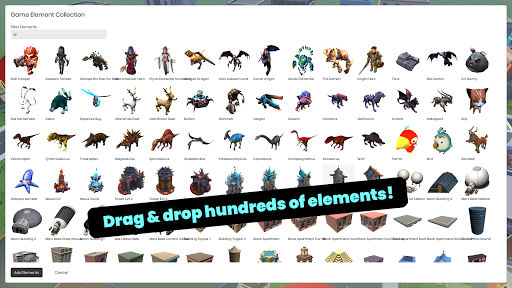
- Asset variety is fixed to what’s in the library, with no imports.
None of these are bugs so much as consequences of the design. The app trades depth for the fact that nobody needs a tutorial to start.
The Democratization Angle Is Real, With an Asterisk
Tools like this reshape who counts as a game developer. A kid who builds three Struckd levels has thought about pacing, difficulty curves and player feedback, which is a real head start on Roblox Studio, GameMaker or Godot later. The platform functions as a first rung more than a destination.
The people who get the most out of Struckd on a Windows machine are creators, not players: if you’re assembling levels for an hour at a stretch, the mouse precision and the larger scene view save you a lot of small corrections that a touchscreen forces on you.



Struckd on Windows: Making 3D Games Without Writing a Line of Code

From Arcade Cabinets to Digital Cards: The Psychology of the Push-Your-Luck Mechanic

How to Fix Lag in Games Once and For All

Why Randomness Makes Some Video Games So Interesting

5 Masterful Video Games Where The Element of Chance Shaped the Narrative

Keyboard vs Controller Gaming: Which One Is Better?

Why Sweepstakes Games Are Catching the Attention of Modern Gamers

GTA 6 Arrives Into a World That Plays Nothing Like 2013

This Unexpected Frieren x MapleStory Crossover Looks Too Perfect

Frieren: Beyond Journey’s End Creator Recommends the Next Hit Action Fantasy Series

From Loot Boxes to Live Experiences: How AI Is Blurring the Line Between Video Games and Interactive Entertainment

The shared design language of video games and interactive digital entertainment

Why Have Animal Characters Taken Over Every Corner Of Gaming?

6 Gaming Platforms That Push Originality to the Forefront

6 Years Later, Haikyu!! Returns in the Last Way Fans Expected

Why Game Culture Needs More Specialist Commentary
-
 Anime3 weeks ago
This Unexpected Frieren x MapleStory Crossover Looks Too Perfect
-
 Anime4 weeks ago
Frieren: Beyond Journey’s End Creator Recommends the Next Hit Action Fantasy Series
-
 Features4 weeks ago
From Loot Boxes to Live Experiences: How AI Is Blurring the Line Between Video Games and Interactive Entertainment
-
 Culture3 weeks ago
The shared design language of video games and interactive digital entertainment
-
 Features3 weeks ago
Why Have Animal Characters Taken Over Every Corner Of Gaming?
-
 Features2 weeks ago
6 Gaming Platforms That Push Originality to the Forefront
-
 Anime3 days ago
6 Years Later, Haikyu!! Returns in the Last Way Fans Expected
-
 Features4 weeks ago
Why Game Culture Needs More Specialist Commentary
-
 Features3 weeks ago
How Much Does Player Housing Really Cost in WoW Midnight?
-

 Anime2 weeks ago
Anime You’ll Be Glad You Added to Your Fall Watchlist (Part-1)
-
 Features2 weeks ago
Why Gamers Love Predicting What Happens Next
-
 Games That Changed Our Lives1 week ago
The Best Ways to Play a Modpack With Friends